Pricepoint raises $6.6M seed round to build the future of hotel revenue management →

Partnerships
Build, refer or grow with Pricepoint. Pick the program that fits how you work with hotels.
Become a partner →Partnerships
Build, refer or grow with Pricepoint. Pick the program that fits how you work with hotels.
Become a partner →October 28, 2026
On 3 November, Pricepoint gets four updates: price change history, takeaway headlines, a clearer demand scale and a fresh new look. Nothing has moved, and your prices work exactly as before.
On Tuesday 3 November, Pricepoint gets four updates: price change history, takeaway headlines, a clearer demand scale and a fresh new look. They're the first of several improvements we're shipping before the end of the year.
The short version: you'll see more of what Pricepoint is doing for you, and nothing has moved. Every feature is where you left it, and your prices are calculated exactly as before.
Watch the 5-minute tour: What's New in Pricepoint: November 2026
Ever looked at a night and wondered why it's priced the way it is? Now you can see exactly where that price came from.
Click any date on your calendar and a slide-out panel opens with a new Price change history tab. It lists every change Pricepoint made for that date, in order. For each one you'll see:
Changes made outside Pricepoint are marked separately, so you can always tell Pricepoint's decisions apart from everyone else's.
It also shows how hard Pricepoint is working in the background. A single night can be reviewed dozens of times before arrival, with the price adjusted each time demand and market signals shift.
Key screens now open with a one-line summary of the main point, starting with your calendar. Look at a future date and it tells you what to expect; look back and it tells you what happened. For example: how the month is tracking on the books against last year.
Instead of digging through charts every morning, you'll know in seconds what's going on and where to look next. Headlines are built from the same numbers shown below them, and they don't change how prices are set.
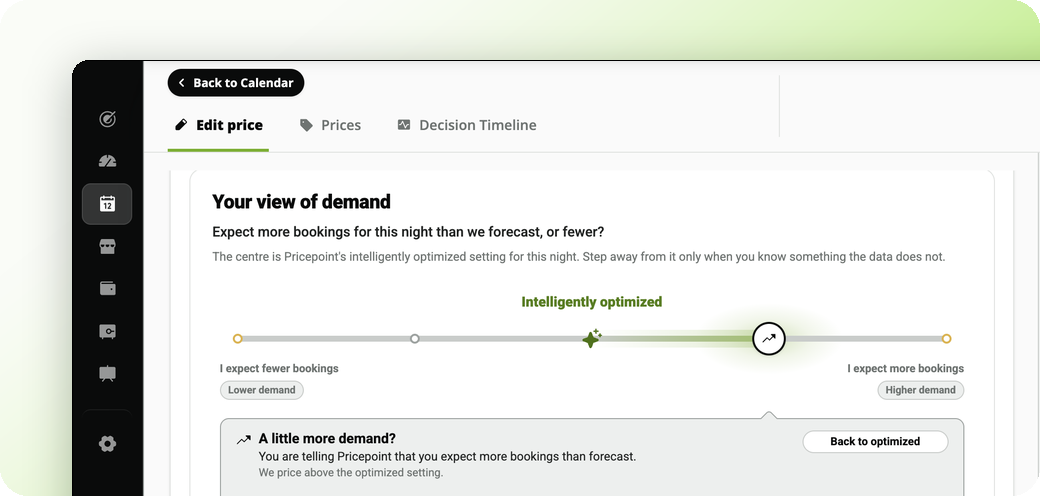
The five demand levels are the same levels you've always had, and they mean exactly what they meant before. What's changed is the wording: they now read as a scale, so you can see at a glance how your price behaves if you choose to adjust it.
Pricepoint shows you what it recommends, and the choice is always yours. Nothing about how your prices are calculated has changed.
The most visible change: Pricepoint has new typography, colours, spacing and icons, and every part of the platform now follows the same design. It's cleaner, more modern and easier on the eyes.
This isn't just a new coat of paint. The new look is the foundation for the updates we're shipping between now and the end of the year.
No. Pricing logic is unchanged. Some labels and the demand level names read differently, but that's wording only.
Nothing moved. Every control, icon and menu is in the same place with the same function. If something seems missing, contact our team.
On your calendar, click any date. The slide-out panel opens, and the Price change history tab lists every change Pricepoint made for that date.
We made the names clearer. The levels themselves, and what they mean, are the same.
A takeaway headline. It sums up the main point of the screen in plain language, using the same numbers shown below it.
Only the styling. Structure, data and meaning are unchanged.
These four updates are the first of several we're shipping before the end of the year, and there's a lot more on the way.
Got questions? Browse our help articles or contact our team.